
Your iPhone Air works with MagSafe accessories that make charging and protecting the phone easier. A MagSafe battery and a MagSafe case are the two you are most likely to use every day. A few simple habits help keep them in good condition for longer. This guide covers good charging practice, case care and the points worth checking before you buy or use an accessory.
The accessories concerned
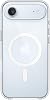
The Apple MagSafe case for iPhone Air comes in two colours, Frost and Shadow. It attaches to the phone and houses the magnets that hold compatible accessories to the back of the device.
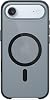
The Shadow version follows the same design with a different finish.
The Apple MagSafe battery attaches to the back of the phone and lets you charge your iPhone Air without a cable when you need to.

Positioning the battery correctly
Magnetic charging works best when the battery sits properly aligned with the back of the iPhone. Place it gently and centred, then check that it holds firmly before you move away. Poor alignment can slow charging and cause unnecessary heating.
Do not slide the battery between the phone and a hard surface, or force it into a tight space. If it looks offset, remove it and reposition it.
Avoiding heat
Heat is the main enemy of a lithium battery. Do not leave the setup charging on a surface in direct sunlight, on a radiator, in a car in summer, or under a cushion that traps warmth. If the phone gets hot while charging, disconnect the accessory and let the device cool before continuing.
Charging before the battery runs critically low
You do not need to wait until the battery is completely empty before recharging it. Lithium batteries generally cope better with frequent partial charges than with repeated full discharges. Get into the habit of connecting the MagSafe battery once the level drops noticeably, rather than only when the phone is close to switching off.
In the same way, there is no need to leave it connected once it is full. Disconnect it when charging is complete, especially if it is sitting on a warm surface or charging unattended overnight.
Cleaning the case without damaging it
Clean the case with a soft cloth, lightly dampened. Wipe the back and edges to remove fingerprints and dust, then dry with a dry cloth.
Avoid solvents, abrasive products and strong alcohol, which can dull the finish or weaken the material. Clear water is usually enough.
Sand and small particles are a particular nuisance. Remove them before you attach or detach the phone, as they can scratch the back of the device or the surface of the case. Also check the edges regularly: yellowing or localised wear can indicate that the material is ageing, and it is worth keeping an eye on.
Checks before pairing accessories
Before using a MagSafe accessory with your iPhone Air, check its compatibility in Apple's documentation. Do not assume that a magnetic accessory will work simply because it clicks into place.
Avoid keeping the phone and battery close to bank cards, transport cards with a magnetic stripe, card holders or unsuitable magnetic mounts. Magnets can interfere with these cards and the data they store. A card holder designed for MagSafe is a safer option if you want to combine the two.
Also make sure your case does not interfere with magnetic alignment. A case that is too thick, badly positioned or damaged can reduce holding strength and get in the way of charging. If the battery no longer holds properly, check the case first before assuming the battery is faulty.
Lifespan and official guidance
The lifespan of a lithium battery depends on how it is used: how often it is charged, temperature, average charge level and storage conditions. There is no guaranteed figure that applies to every user, and battery gains vary from one person to another.
The manufacturer's instructions and Apple's documentation are the reference. If you have doubts about charging, compatibility or the condition of an accessory, refer to these official documents rather than unverified tips. Applying these simple habits consistently is the best way to look after the MagSafe battery and case for your iPhone Air.


