Buying a gaming accessory without knowing the exact setup is risky. A controller built for PS5 is not always the right choice for a PC, and a memory card has to suit the device that will read it. This guide goes through five accessories and the criteria to check before comparing prices.
Prices shown in the cards below can change every day, especially close to Christmas. Check them on the day you buy.
Start with the player's setup
First, note the console or PC being used, the phone, and any handheld console. This information decides whether almost every accessory here will work. If you are not sure, look at the boxes already in the house or ask for a photo of the desk.
The controller: compatibility and comfort
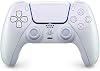
The Sony DualSense is presented as compatible with PS5 and PC, with haptic feedback, adaptive triggers, a built-in microphone and a rechargeable battery. On PC, check that the game and the system recognise this model and that the connection you plan to use matches your setup.
Criteria to compare:
- the compatibility listed on the full product page, console by console;
- the connection type and whether a charging cable is included;
- the colour, which does not change the functions but matters to some players.
The controller stand and phone holder

This stand combines a phone holder and a controller holder, with a Disney Donald Duck figure. The title states compatibility with Xbox, PlayStation and most controllers. Before buying, check the exact controller model and your phone size, since these stands do not all fit every format.
It is a desk accessory that can also serve as decoration. If the recipient mostly plays on the move, a more compact model will suit them better.
The microSD card: capacity and speed class

The SanDisk Extreme card named in the title lists Class 10, UHS-I, U3 and V30 ratings, read speeds up to 100 MB/s, and the A1 app performance mark. The stated capacity is 32 GB, which is limited for recent games. Before ordering, check the capacity on the full listing and confirm that your phone or handheld console supports this format.
Capacity is written in different ways from one shop to another, so compare the GB figure rather than just the card name.
The SSD: external storage or a PC upgrade

The title describes a 2.5 inch SSD with a SATA III interface. This type of drive is used as extra or external storage, for example on a PC. It does not install as an internal expansion for the PS5, which requires an M.2 PCIe SSD. Do not buy it to expand a console without checking this point first.
On a PC, check the connector type on your motherboard or case, and the free space available.
The USB-C charger: power and cable

This charger is listed at 25 W, with a 1 m USB-C cable rated 60 W and PD 3.0 with PPS support. The title names several devices, including iPhone, iPad, Samsung Galaxy and Nintendo Switch. Always check your exact device model on the listing, because the real charging power depends on the device.
A charger is only useful if the cable and plug match the rest of the equipment. Plugs differ between countries, and the UK uses a different plug type from most of the EU, so a travel adapter may be needed.
Before you buy
Brand names, model codes and capacity formats vary between countries. The same card can carry different labels on Amazon.co.uk, Amazon.fr, Amazon.de, Amazon.it or Amazon.es. Read the full listing before comparing.
Check the seller too. An item sold and shipped by Amazon does not come with the same conditions as an offer from a third-party seller. Look at shipping costs, delivery times and return terms, and compare the total delivered price, not only the price shown.
Finally, remember that prices change from day to day. A good gift is first a product that works with the player's equipment. The best price is chosen afterwards, on the day you order.